The aim is to produce a comprehensive list of the foods available to the local population so that users completing their dietary recall can easily find the foods and drinks they consumed. This should be completed by a nutritionist or dietitian familiar with the local food environment (including any regional variations) and experienced in linking local dietary intake data with food composition data.
Assessing foods already in the system
The Intake24 system contains a comprehensive list of foods. For adaptation of the system for another locale the food list is provided as an excel spreadsheet (available here).
Go through this list of foods to identify in column A (Action) whether the existing foods should be:
- deleted as the food is not consumed by the target population
- kept maintaining the existing links to food composition and food portion size data
- kept, but linked with local food composition data and/or food photographs.

The columns “Action”, “Quality of match” and “Frequency of consumption” all have dropdown lists to select from. Frequency of consumption can be added if known. This is to help identify where time should be spent on assigning portion size and food composition data. The quality of match will be added once food composition data has been assigned.
The “Food composition table” and “Food composition record ID” fields should be left as is, for food to be kept in the database with the existing links. For new foods and foods kept in the database but linked to local food composition data enter the local composition table to be used (e.g. MyFCD for the Malaysian database). Add the food code in the food composition record ID column (format does not matter i.e. can be numbers letters or combination). If food composition data are still to be calculated/gathered simply add a code to signify the country e.g. ID for Indonesia. Where recipe calculations are to be conducted “Recipe Calculation” can be inserted in the food composition table column.
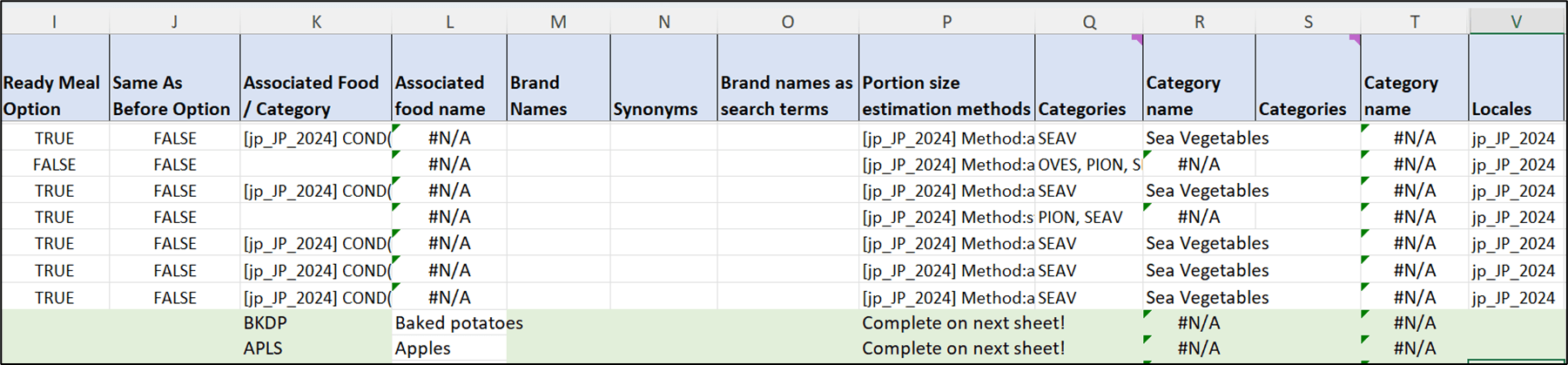
The ready meal option is only used for surveys where the user wants to distinguish between homemade and packaged meals. This should be set to TRUE if the question “is this a packaged item” is to be asked for that specific food.
The “Brand names” column is used only in surveys where brand needs to be asked for specific foods, e.g this was used in a survey of sugars intakes to determine which brand of cereal or fruit juice was consumed. The “Synonyms” column should be used to enter alternative names for the same food item but where everyone would recognise the name of the food in the food list. The “associated food/ food category” column is used to generate the prompts within the system for foods commonly consumed together. Add the category code and then the question to be asked e.g. BTTR({en: Did you have any butter or margarine on your bread?}). The “brand names as a search term” column is used for brand names which may be entered by the user in the quick list but that you do not want to be displayed in the food name, e.g. frosties for frosted cornflakes.
The “Categories” columns are used to assign foods to a category e.g Meat or Fruit. There is a drop down with the four letter category codes and category name columns with vlookup. The “Locales” column lists all of the locales which that food entry is used in.
The Green section at the bottom of the spreadsheet is for adding new foods.
Identifying regional foods to add
Step 1 – If the country has its own comprehensive food composition tables, these can be used as the starting point for the local food list as this negates the step of matching the food item to the composition code.
Step 2 – Identify additional foods to include using; national dietary data, large research datasets, food purchase data, local knowledge (Dietician / Nutritionist), supermarket websites, restaurant menus and recipe books. Bear in mind regional variations in the way food is prepared which need to be captured by the system. In some cases, it may be necessary to include several versions of a dish including the details of the region. For foods which are commonly consumed and where different varieties/brands/cuts of meat/cooking methods make a significant difference to the nutritional content, it is worth including a number of options. For foods less commonly consumed the most frequently consumed item could be included e.g. “Gala apple”, or a generic term such as “Red apple average” could be used.
Step 3 – Check the naming of the food is as clear as possible in order that the item can be easily identified by the user. The food descriptions given in the food composition tables will probably need to be changed to be terms which the general public would recognise and use. Food names should be specific, for meat for example, the cut of the meat and the cooking method should be given, for fruit the variety and colour should be given. There needs to be a balance between the user being able to select the specific food which they consumed and the length of the search list returned so bear this in mind (along with the frequency of consumption) when deciding how many varieties of a particular food to include.
Step 4 – Each new food item should be added to the food list spreadsheet and the fields for English description, local description, food composition table, food composition record ID (food code) and brand names columns should be completed.